Flex on the job

Know what you have,
where it is, and what it's worth.

Flex is inventory, job, and invoicing software for businesses that work on the job — HVAC, electrical, plumbing, and any crew that runs jobs. It tracks your stock at the shop, on the trucks, and on the job site. You move stock with scanned transfers. You build kits. You turn each job into an order and an invoice. You never type the same thing twice.

Works offline on Windows Same data on the web One count for every place
A busy trades warehouse aisle with shelves of parts and a work van, ready for the day One count, every place
app.flexonthejob.com — Dashboard
Flex dashboard for an HVAC company: open jobs with status, payment state and next steps, plus quick actions
See it

Your whole shop on one screen.

See every open job at a glance. You know its status, what's been paid, and what to do next. Schedule it. Move the parts. Finish it. Send the bill. Every job and every place use one count, so the office and the crew see the same numbers.

Open the dashboard
For the field and the office

The crew in the field.
The office with the numbers.

In the field

Move stock without losing it

Stock walks off on trucks and job sites. Flex makes every move a transfer. You pick it, scan it, and confirm it. So what left the shop is what shows up on the job.

  • Pick and scan every transfer
  • Move a whole kit as one line
  • Hold parts for a job before the truck leaves
In the office

Let the paperwork write itself

Jobs use stock. Stock runs low. Customers need a bill. Flex ties the three together. Your orders and invoices come from what really happened, not from memory.

  • Bills built from what the job used
  • Low stock lands on a reorder list, by vendor
  • See who changed what, and when
What it does

One system, from the shelf
to the invoice.

Items, templates & categories

Set up an item once. Then stock it anywhere. Its category, barcode, cost, and price stay the same in every place.

Locations & transfers

Warehouses, trucks, job sites, bays. Move stock between them and scan each pick. You see any gap the moment it happens.

Jobs → orders → invoices

Hold and use stock on a job. Then turn it into an order, an invoice, and a payment. Job status and labor rates are built in.

Kits & bundles

Group items into a kit. The whole kit prices, holds, and moves as one line. Swap in a sub when the shelf runs short.

Purchasing & reorder

Set a minimum for each item at each place. When stock drops below it, Flex flags it by vendor. Build the purchase order from that list, then receive it back in when it lands.

Roles, audit & reports

Give each user the right access. Keep a log of who changed what. Run reports on value, usage, and stock moves.

A day in the shop

From the calendar to the invoice.

Here's a small HVAC shop. Three techs, one week of work. This is how it looks in Flex.

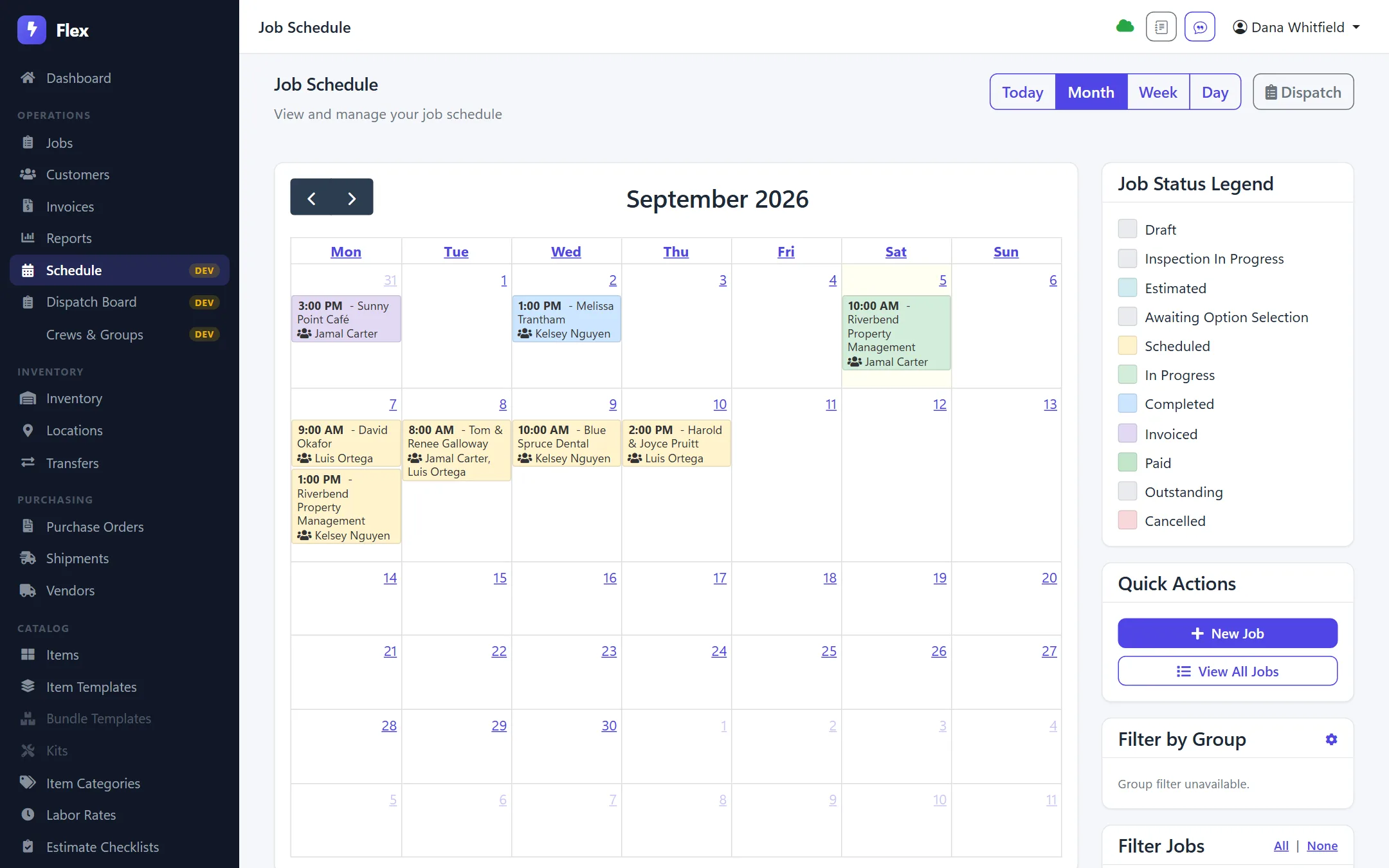
Schedule
Month calendar of scheduled jobs, color-coded by status, showing which technician is assigned to each
Schedule the crewEvery job sits on a calendar, colored by status. Each tech is right on the card. View it by month, week, or day.
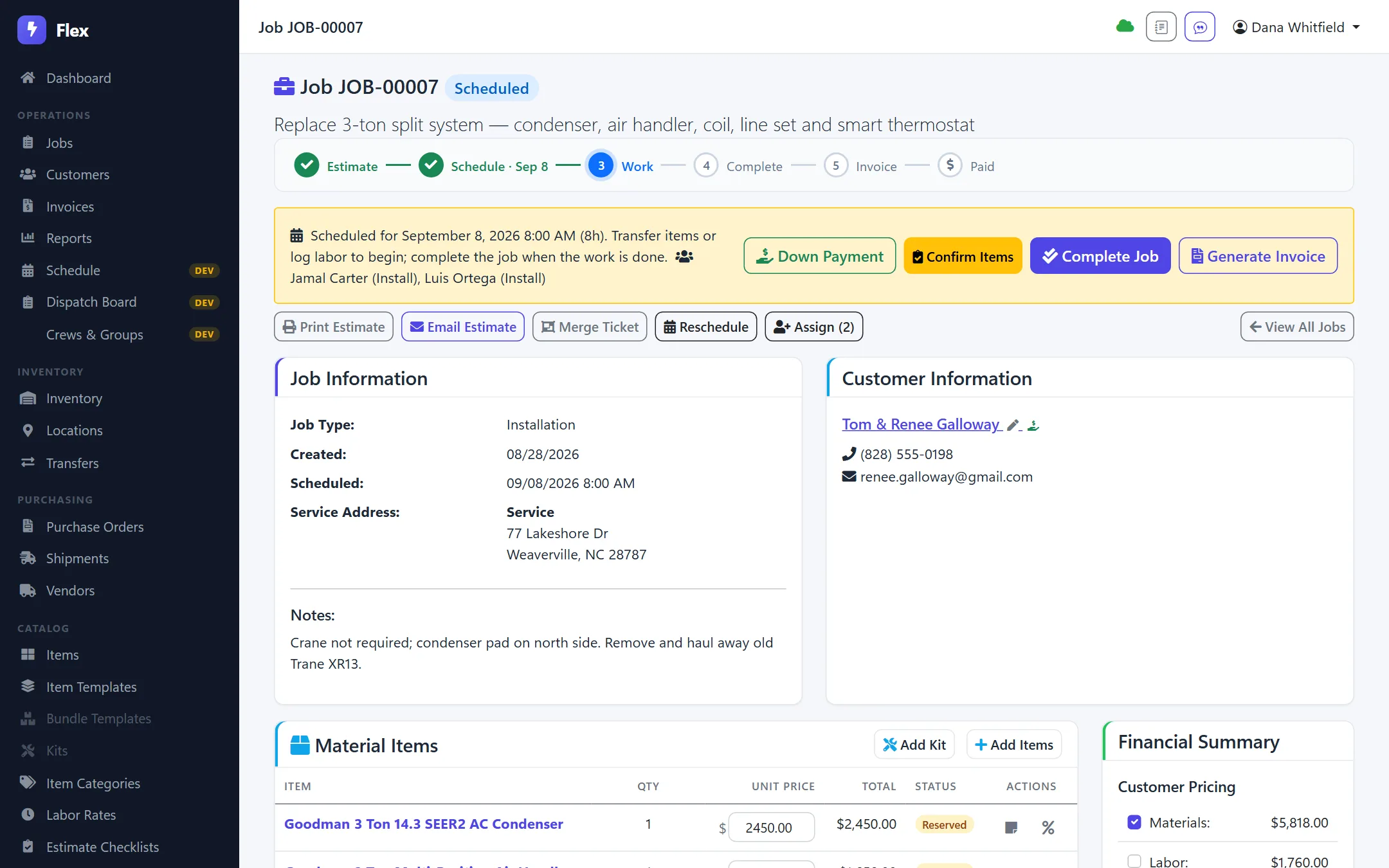
Job · 3-ton replacement
Job detail page for a 3-ton split system replacement: estimate, schedule, work, complete, invoice and paid steps with customer and material items
Run the jobEstimate, schedule, work, finish, invoice, paid. All on one page. Parts are held and sent to the site. The customer can get an "on my way" text.
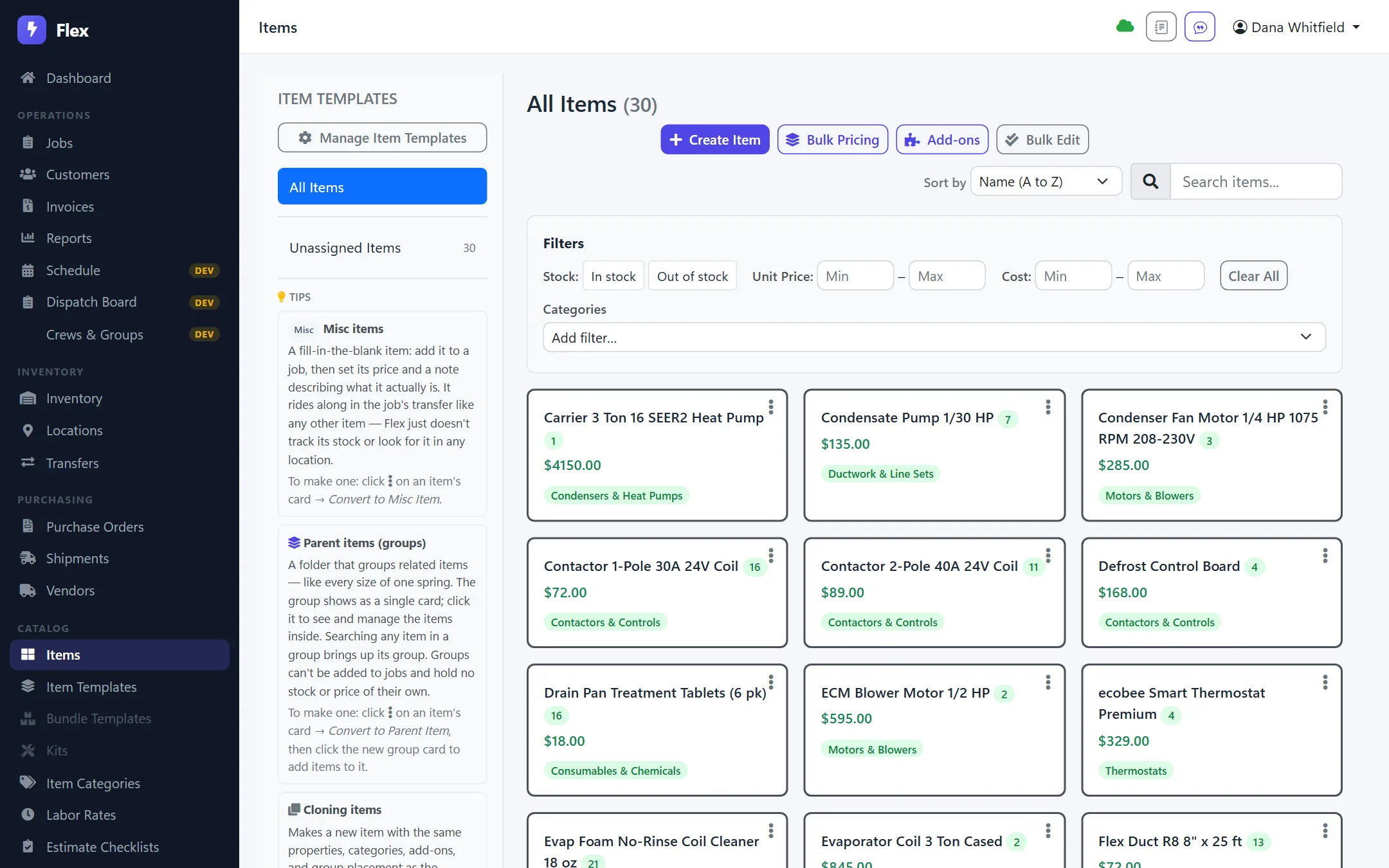
Items
Items catalog showing HVAC parts with on-hand counts, prices and categories
Know what's on the shelfSee on-hand counts for the shop and every van. Search by name, barcode, or category.
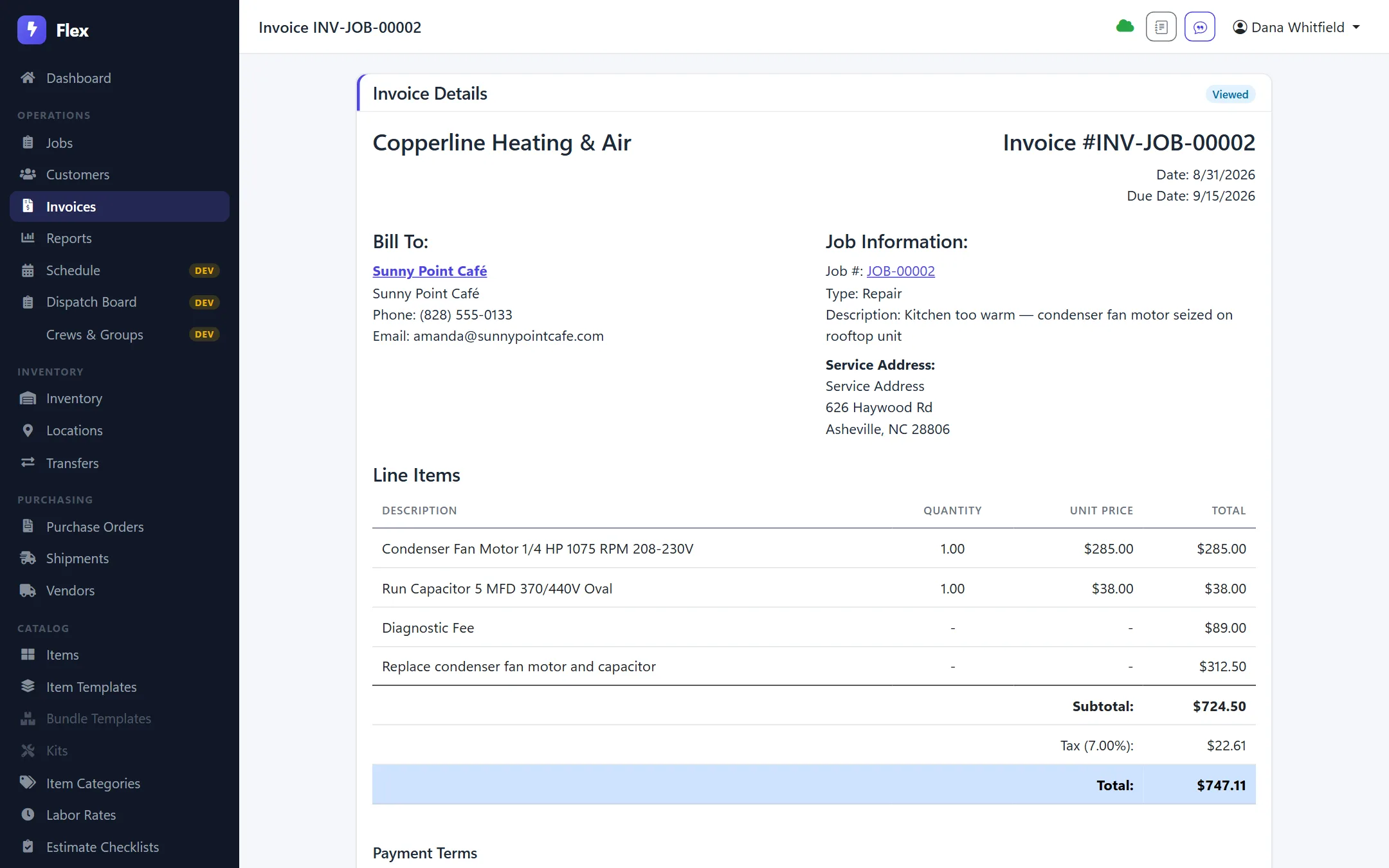
Invoice
Invoice built from a completed repair job: parts, diagnostic fee, labor, tax and total
Invoice what was usedParts, labor, and fees come right off the job. Tax and part payments are built in.
Desktop & web

Works where the internet doesn't.

Flex runs on Windows and keeps its own data on the machine. So the shop keeps working when the internet drops. It syncs to the cloud. The same data is on the web for the office. And now there's an Android app to run things from a phone or tablet.

Windows desktop

Available

Installed on your computers. It keeps its own data and works offline. It syncs on its own once it's back online. Scanners and label printers plug right in.

Web app

Available

The same data, live in your browser at app.flexonthejob.com. Nothing to install. Great for the office, sales, or the owner on the road.

Mobile app

New · Android

Run the back office from a phone or tablet. See the dashboard, jobs, customers, invoices, and stock. Add and edit items too. It works offline.

Download for Android

A field app and iOS are on the way.

1
count for every warehouse, truck, and job site
0
times you type the same thing twice
Offline
the desktop keeps working with no internet
API
keys and webhooks for your own tools
For developers & integrators

An API your tools can actually use.

Every account gets its own API keys. There's a full REST API with an OpenAPI spec. Webhooks fire when jobs, invoices, and transfers change. Hook up your books, your web store, or an AI helper that answers "what's on Truck 3?"

  • API keys per account, with rate limits
  • Safe to retry, safe to automate
  • Webhooks with signed data and logs
Questions

The basics, answered.

Does it work with no internet?

Yes. The Windows app keeps its own data and works offline. When it's back online, it syncs. The same account shows up on the web.

Can I track stock in more than one place?

Yes. That's the whole point. Every place has its own count. Moving stock is a transfer you pick, scan, and confirm.

Does it do barcode scanning?

Yes. Items have barcodes. You can pick a transfer with a scanner. So the count matches what really moved.

How do jobs, orders, and invoices connect?

A job holds and uses stock. Flex builds the order and the invoice from what was used. It records payments. And it flags anything that drops below its minimum so you can build a purchase order before you run out.

Can different people see different things?

Yes. You set what each person can see and do. And every change is logged.

Is there a mobile app?

Yes. An Android app is ready now. Download it here to run the dashboard, jobs, customers, invoices, and stock from a phone or tablet. It works offline. A field app for scanning on the truck is on the way, and iOS is coming too. The web app also works in a phone browser.

Can I turn features on and off?

Yes. Flex is modular. Add-ons like scheduling and customer texts are optional. Turn on what you need.

How do I get started?

Already set up? Sign in here. If not, ask for a demo and we'll show you on your own data.

Stop counting twice.

One count. Every place. Every job. And the paperwork writes itself.

Sign in to Flex Request a demo